
.png)
Short Answer: What Is a POS System in Retail?
A POS (point-of-sale) system in retail is the combination of hardware and software used to complete transactions and manage core store operations. It does more than process payments. A modern POS connects sales, inventory, pricing, and reporting into one system, giving operators real-time control over how the store runs.
Key Takeaways
- A POS system processes transactions and accepts payments
- It tracks inventory in real time as items are sold
- It manages pricing, promotions, and product data
- It provides reporting on sales, margins, and performance
- It connects front-end checkout with back-office operations
What Does a POS System Actually Do?
Most people think of a POS as just a register. In reality, it is the operational center of the store.
Transaction Processing
At the most basic level, a POS:
- Scans items
- Calculates totals, tax, and discounts
- Accepts payments (cash, card, mobile)
But this is just the starting point.
Inventory Management
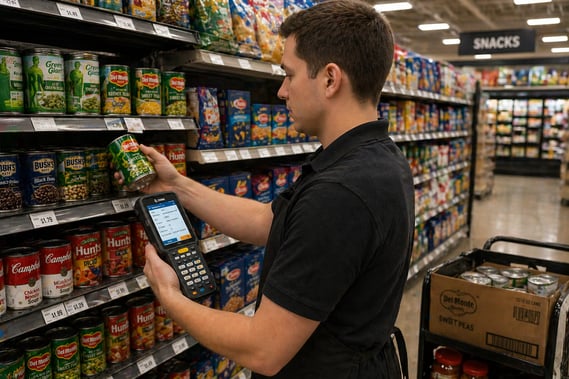
Every transaction updates inventory automatically.
This means:
- Stock levels adjust in real time
- Out-of-stocks can be identified quickly
- Reordering decisions are based on actual sales
For convenience stores and grocers, this directly impacts shrink, spoilage, and availability.
Pricing and Promotions
The POS controls what the customer pays.
It manages:
- Item pricing
- Discounts and promotions
- Multi-buy offers and bundles
When pricing is centralized, stores avoid mismatches between shelf and register, which reduces errors and improves trust at checkout.
Reporting and Visibility
A POS system captures data on every transaction.
Operators can track:
- Sales by item, department, or category
- Margin performance
- Peak hours and transaction volume
- Cashier activity
This visibility is what allows stores to make better decisions instead of guessing.
POS System Components
A retail POS system includes both hardware and software working together.
Hardware
- Registers or terminals
- Barcode scanners
- Receipt printers
- Payment devices (pin pads)
Software
- Sales and transaction processing
- Inventory tracking
- Pricing and promotion management
- Reporting and analytics
Modern systems also connect to:
- Back office systems
- Loyalty programs
- eCommerce platforms
Why POS Systems Matter for Store Operations
A POS system is not just about checkout speed. It directly affects how efficiently a store runs.
Faster Checkout
- Reduces lines
- Improves customer experience
- Increases throughput during busy periods
Better Inventory Control
- Reduces over-ordering
- Minimizes out-of-stocks
- Helps manage perishable items more effectively
Improved Accuracy
- Eliminates manual pricing errors
- Keeps transactions consistent
- Reduces shrink caused by mistakes
Real-Time Decision Making
- Operators can see what is selling right now
- Adjust pricing or promotions quickly
- Identify issues before they become problems
POS Systems in Convenience Stores vs Grocery Stores
While the core function is the same, how POS is used can vary.
Convenience Stores
- High transaction volume
- Focus on speed and fuel integration
- Tight margins require accurate pricing and reporting
Grocery Stores
- Larger product catalogs
- More complex inventory management
- Greater emphasis on fresh and perishable items
In both cases, the POS system plays a central role in keeping operations aligned.
Modern POS vs Traditional Cash Registers
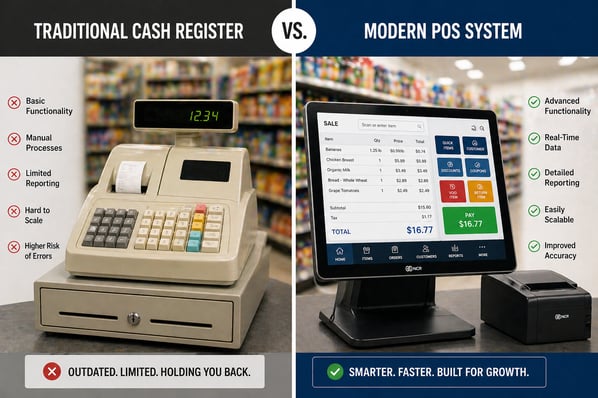
Older systems were limited to ringing up sales.
Modern POS systems:
- Integrate with inventory and back office systems
- Provide real-time reporting
- Support promotions and loyalty programs
- Connect to other store technologies
This shift is what allows stores to move from manual processes to more efficient, data-driven operations.
How POS Systems Connect to Other Store Systems
A POS system does not operate on its own.
It typically connects to:
- Inventory and ordering systems
- Pricing and promotion tools
- Loyalty and customer engagement platforms
- Kitchen or prepared food systems
This integration reduces manual work and keeps all parts of the store aligned.
Common Challenges Without a Modern POS
Stores using outdated or disconnected systems often deal with:
- Manual inventory tracking
- Pricing inconsistencies
- Limited visibility into sales and margins
- Slower checkout times
- Increased labor requirements
These issues directly impact profitability and day-to-day operations.
Conclusion
A POS system in retail is more than a tool for completing transactions. It is the foundation that connects sales, inventory, pricing, and reporting into a single system.
For convenience stores and grocers, the POS system plays a critical role in improving efficiency, reducing errors, and providing the visibility needed to manage the business effectively.
See how a Modern POS system Works in Your Store
Not all POS systems are built for the realities of grocery and convenience store operations. From high-volume checkout to real-time inventory and reporting, the right system needs to support the way your store actually runs day to day.
RORC is designed to connect front-end checkout, back office operations, and real-time data into a single system, helping stores improve efficiency, reduce manual work, and gain better visibility into performance.
Explore how RORC supports modern retail operations
FAQs
What does POS stand for in retail?
POS stands for point of sale. It refers to the place where a transaction is completed and the system used to process it.
Is a POS system just a cash register?
No. A modern POS system includes software and integrations that manage inventory, pricing, reporting, and other core operations beyond just processing sales.
How does a POS system help reduce shrink?
By tracking inventory in real time and improving pricing accuracy, a POS system helps identify discrepancies and reduce losses from errors or theft.
Can a POS system integrate with other retail systems?
Yes. Modern POS systems connect with back office software, inventory systems, loyalty programs, and other tools to streamline operations.
Why is a POS system important for small retailers?
It provides visibility into sales and inventory, reduces manual work, and helps operators make better decisions, even with limited staff and resources.